---
title: Create shipment notifications
description: Set up a notification rule in Spaceship Pro to automatically email your customer or team when a shipment reaches the delivery statuses you select.
---
[Skip to content](https://support.spaceshipapp.com/en/what-questicon-is-your-article-answering#main-content)
English
Show submenu for translations
![Logo 2.png\]](https://support.spaceshipapp.com/hs-fs/hubfs/Logo%202.png?height=40&name=Logo%202.png)
Open main navigation
Close main navigation
- English
Show submenu for translations
- [Go to spaceshipapp.com](https://www.spaceshipapp.com/)
[Go to spaceshipapp.com](https://www.spaceshipapp.com/)
How can we help you?
- There are no suggestions because the search field is empty.
1. [Help Center](https://support.spaceshipapp.com/en)
2. [Spaceship Pro Setting](https://support.spaceshipapp.com/en/spaceship-pro-setting)
3. [Other Settings](https://support.spaceshipapp.com/en/spaceship-pro-setting#other-settings)
# Create shipment notifications
## Automatically email your customer or team when a shipment reaches the delivery statuses you select.
### 
### Create a notification rule
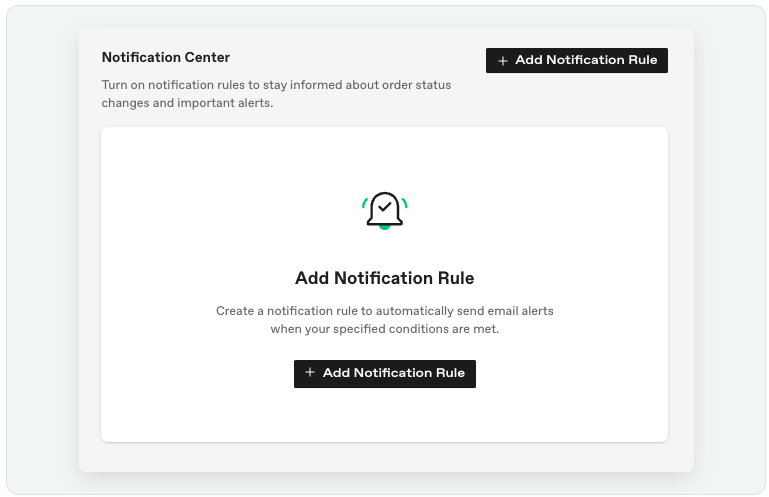
1. Go to **Settings → Notification Center**.
2. Select **Add Notification Rule**.
3. Enter a rule name and an optional description.
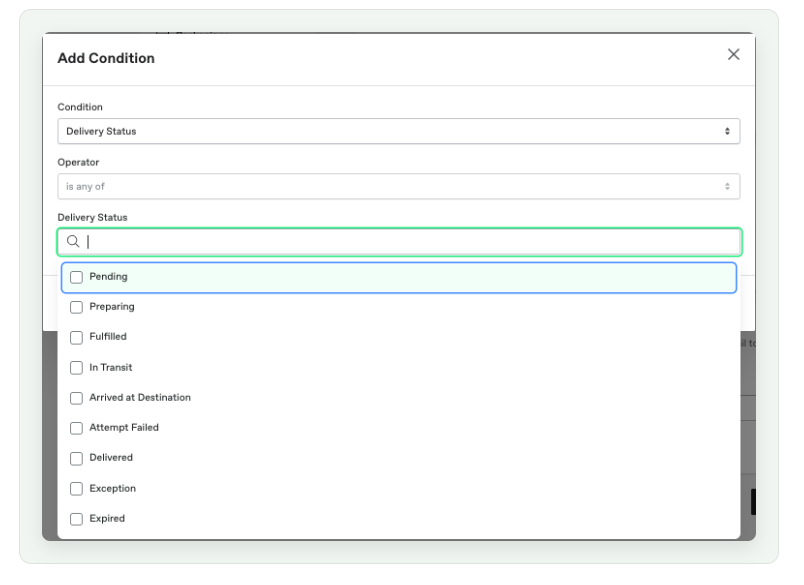
4. Under **Conditions**, select **Add Condition**.
5. Choose **Delivery Status** and select the statuses that should trigger the email.
6. Choose whether to notify the receiver, the registered merchant email, or both.
7. Select **Send Test Email** to preview the notification.
8. Select **Submit** to save the rule.
### What recipients receive
The notification contains the order reference, tracking number, carrier, current delivery status and latest tracking details. The current notification template displays the update in English and Traditional Chinese.
**Tip:** Send a test email before activating the rule so you can check the content and recipient settings.
*Last Updated On 1 Sep 2026*
- [Latest News](https://support.spaceshipapp.com/en/latest-news#main-content)
- [Bad Weather and Holiday Arrangement](https://support.spaceshipapp.com/en/latest-news#bad-weather-and-holiday-arrangement)
- [Spaceship Fee](https://support.spaceshipapp.com/en/spaceship-fee#main-content)
- [Spaceship Fee](https://support.spaceshipapp.com/en/spaceship-fee#spaceship-fee)
- [HK Courier Additional Surcharge](https://support.spaceshipapp.com/en/spaceship-fee#hk-courier-additional-surcharge)
- [China Courier Additional Surcharge](https://support.spaceshipapp.com/en/spaceship-fee#china-courier-additional-surcharge)
- [Courier](https://support.spaceshipapp.com/en/courier#main-content)
- [Spaceship Air](https://support.spaceshipapp.com/en/courier#spaceship-air)
- [Other Courier](https://support.spaceshipapp.com/en/courier#other-courier)
- [Spaceship Pro User Guide](https://support.spaceshipapp.com/en/spaceship-pro-user-guide#main-content)
- [Fulfilment Service](https://support.spaceshipapp.com/en/spaceship-pro-user-guide#fulfilment-service)
- [Shipping Service](https://support.spaceshipapp.com/en/spaceship-pro-user-guide#shipping-service)
- [Collection](https://support.spaceshipapp.com/en/spaceship-pro-user-guide#collection)
- [Billing & Payments](https://support.spaceshipapp.com/en/spaceship-pro-user-guide#billing-payments)
- [Industry Guide](https://support.spaceshipapp.com/en/spaceship-pro-user-guide#industry-guide)
- [Spaceship Pro Setting](https://support.spaceshipapp.com/en/spaceship-pro-setting#main-content)
- [Store Integrations](https://support.spaceshipapp.com/en/spaceship-pro-setting#store-integrations)
- [Carriers](https://support.spaceshipapp.com/en/spaceship-pro-setting#carriers)
- [Products Management](https://support.spaceshipapp.com/en/spaceship-pro-setting#products-management)
- [Shipping Automation](https://support.spaceshipapp.com/en/spaceship-pro-setting#shipping-automation)
- [Other Settings](https://support.spaceshipapp.com/en/spaceship-pro-setting#other-settings)
- [Customs Clearance](https://support.spaceshipapp.com/en/customs-clearance#main-content)
- [Duty & Tax](https://support.spaceshipapp.com/en/customs-clearance#duty-tax)
- [Country Regulation](https://support.spaceshipapp.com/en/customs-clearance#country-regulation)
- [Commodity Restrictions & Compliance](https://support.spaceshipapp.com/en/commodity-restrictions-compliance#main-content)
- [Restricted/ Prohibited items](https://support.spaceshipapp.com/en/commodity-restrictions-compliance#restricted-prohibited-items)
- [Restricted/ Sensitive Shipping Items Reminder](https://support.spaceshipapp.com/en/commodity-restrictions-compliance#restricted-sensitive-shipping-items-reminder)
- [Lithium Batteries Shipping](https://support.spaceshipapp.com/en/commodity-restrictions-compliance#lithium-batteries-shipping)
- [Customer Service Support](https://support.spaceshipapp.com/en/customer-service-support#main-content)
- [Shipping 101](https://support.spaceshipapp.com/en/customer-service-support#shipping-101)
- [Business Customer Helpdesk](https://support.spaceshipapp.com/en/customer-service-support#business-customer-helpdesk)
- [About Claim](https://support.spaceshipapp.com/en/customer-service-support#about-claim)
- [FAQ](https://support.spaceshipapp.com/en/customer-service-support#faq)
- [Spaceship Care](https://support.spaceshipapp.com/en/spaceship-care)
- [General Shippers Reminders](https://support.spaceshipapp.com/en/general-shippers-reminders#main-content)
- [Frequently Asked Questions](https://support.spaceshipapp.com/en/general-shippers-reminders#frequently-asked-questions)
[](https://www.spaceshipapp.com/)
Help Center
Copyright © 2026, Spaceship