![Logo 2.png]](https://support.spaceshipapp.com/hs-fs/hubfs/Logo%202.png?height=40&name=Logo%202.png)
Direct Signature Delivery
Direct Signature Delivery requires a person at the delivery address to sign before a parcel can be released. It provides additional delivery control for valuable or sensitive shipments.
If no eligible person is available to sign, the parcel will not be left unattended. The delivery carrier may reattempt delivery or leave a notice with instructions to arrange redelivery or collect the parcel from the designated collection point.
Service availability
Direct Signature Delivery is available only for selected shipping services and destination routes. Availability, fees, signer requirements, redelivery procedures, and collection options may vary by carrier and destination.
Direct Signature Delivery is currently available for:
- Exports from Hong Kong via FedEx International Priority (IP), FedEx International Economy (IE), and FedEx International Connect Plus (FICP), on eligible destination routes.
- Shipments from Hong Kong to the United States via Spaceship Air – Cosmetics and Spaceship Air – Express (Tax Inclusive).
Add Direct Signature when creating the shipment
You can add Direct Signature Delivery when creating an eligible shipment in Spaceship Pro.
- Create a shipment and enter the sender, recipient, parcel, and customs details.
- Select an eligible shipping service and destination route.
- In the Value-added Services section, select Direct Signature Delivery.
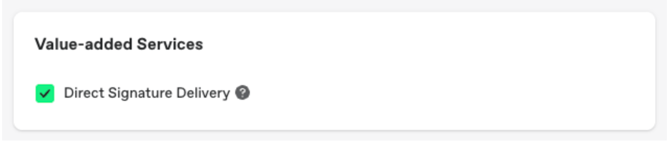
- Confirm the applicable fee shown in the shipment cost summary.
- Purchase the label. The shipping label will be marked “DIRECT SIGNATURE REQUIRED.”
Add Direct Signature with a shipping rule
You can automatically add Direct Signature Delivery to eligible shipments by creating a shipping automation rule.
- Go to Shipping Automation and select Add New Rule.
- Enter a rule name and set the conditions, such as Ship from: Hong Kong and the applicable destination country or region.
- Select Add Action, and choose Direct Signature Delivery.
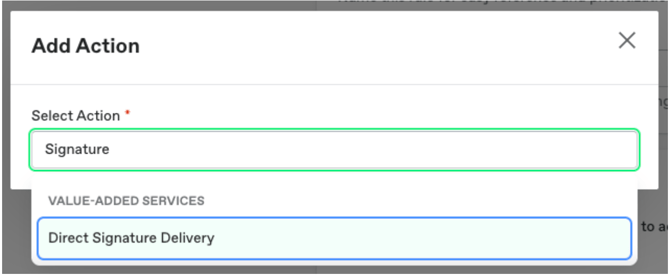
- Select Create to save the rule.
The rule applies to new shipment drafts created through imports and store integrations. It does not automatically apply to manually created shipments. Direct Signature Delivery will only be added when the selected shipping service and route support the option.
Fees
Direct Signature Delivery is subject to an additional surcharge. The applicable fee varies by courier, shipping service, origin, and destination.
Please refer to the relevant courier’s Additional Surcharges page for the current Direct Signature Delivery charge:
- FedEx: FedEx Additional Surcharges
- Spaceship Air: Spaceship Air Additional Surcharges
Important note:
- The parcel may be redelivered, held for collection, or returned to the sender if delivery cannot be completed.
- Redelivery, storage, collection, return, or other carrier charges may apply where applicable.
- Direct Signature Delivery does not necessarily include a downloadable signature image or proof-of-delivery document. Availability depends on the carrier and service.
Last Updated on 30 Sep 2026